
How to enroll in your CHOICE health benefit
Your employer and Gravie are working together to administer your health benefits through CHOICE. With Gravie CHOICE, you get to choose which health plan you want, and we help to keep everything running in the background.
We’re here to help you on your way.
Watch this short video and continue down the page for step-by-step instructions to set up your health plan.
Understanding the roles and responsibilities of your employer, your carrier and you.

(as the employee)
in an individual health insurance plan using the Gravie shopping portal.
your own health insurance policy, including reviewing claims and managing your plan’s benefits.
any premium balance not covered by your employer’s CHOICE arrangement, and set up autopay with your carrier if you chose a self-enroll plan. Gravie pulls the full premium, so you may need to reimburse your employer, usually through payroll deductions.
your health insurance plan if your employment ends or your eligibility changes and you don’t want to keep the coverage and pay the full cost yourself without employer contributions.

from your employer’s CHOICE benefit are set aside to help reimburse you for the cost of eligible health insurance premiums.
eligibility rules and contribution amounts for the CHOICE arrangement.
with Gravie to facilitate employee access to the shopping portal and benefits.
CHOICE funding if the employee leaves or becomes ineligible.

individual health insurance plans available to you.
your enrollment, coverage, claims, and billing for the member’s policy.
premium payments directly from Gravie.
plan cancellations, renewals, and coverage updates as directed by the member.
And, we’re Gravie.
Behind the scenes, we help move the money, connect the dots, and make everything work smoothly between you, your employer, and your chosen carrier.
Enrollment Options: Easy Enroll vs. Self-Enroll
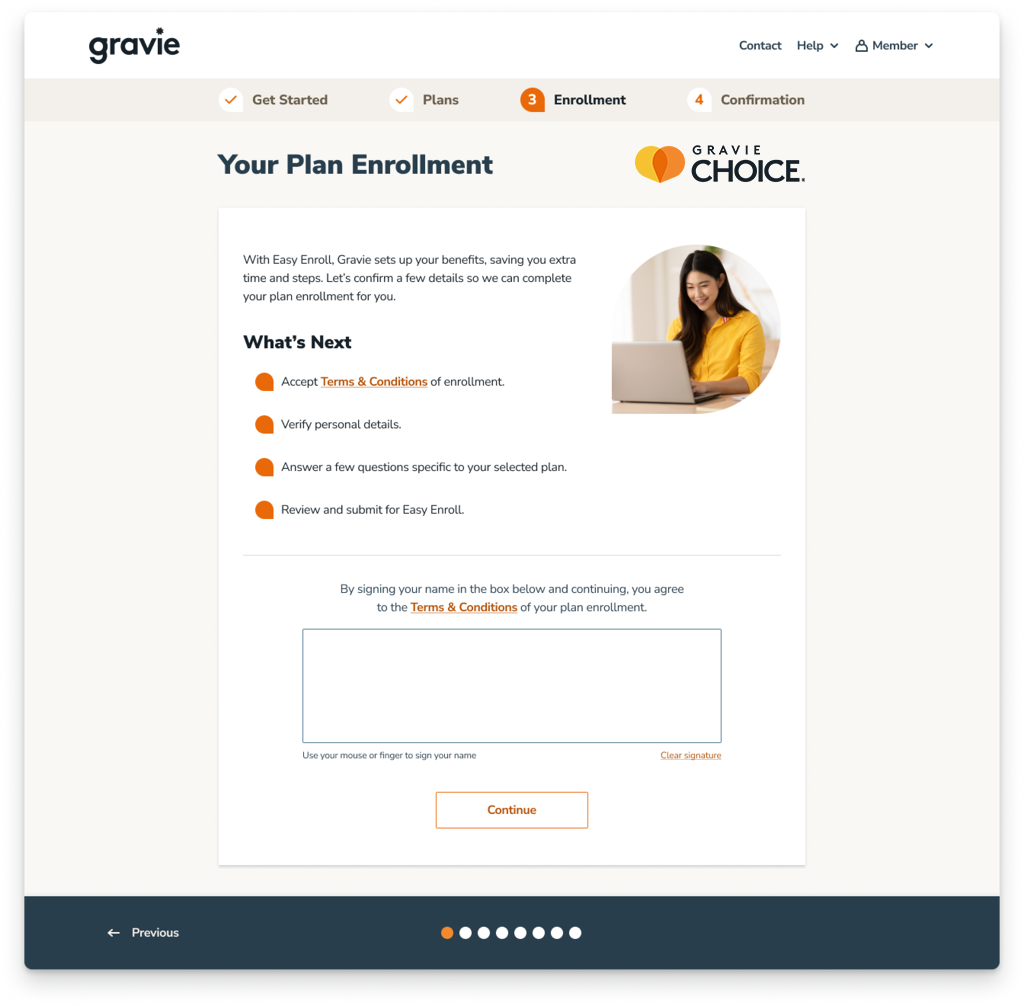
We offer two types of plans: Easy Enroll and Self-Enroll. Easy Enroll plans allow you to get enrolled via a smoother experience with fewer steps and more support directly through Gravie. If Easy Enroll plans aren’t available in your area, Self-Enroll plans still provide access to great coverage along with helpful guidance from our Gravie Care® team.
Here are the main differences between Easy Enroll and Self-Enroll plans:
Feature/Task |
Easy Enroll |
Self-Enroll |
|---|---|---|
| Plan selection through Gravie site |
Easy Enroll
Yes
|
Self-Enroll
Yes
|
| Can apply employer contribution pre-tax or post-tax to the plan |
Easy Enroll
Yes
|
Self-Enroll
Yes
|
| Support from Gravie Care advisors |
Easy Enroll
Yes
|
Self-Enroll
Yes
|
| Flexibility to filter plans by provider networks, HSA-eligible, and drug coverage. |
Easy Enroll
Yes
|
Self-Enroll
Yes
|
| Carrier enrollment completed on Gravie portal |
Easy Enroll
Yes
|
Self-Enroll
No
you’ll need to finalize with your chosen carrier.
|
| Gravie Registration Completed at Checkout |
Easy Enroll
Yes
|
Self-Enroll
No
You’ll need to upload proof of coverage after carrier enrollment.
|
| Gravie helps monitor payments and resolve issues with carrier |
Easy Enroll
Yes
|
Self-Enroll
Limited
Employee may need to assist.
|
| Premiums automatically paid via Gravie CHOICE account |
Easy Enroll
Yes
Gravie makes premium payments for you. In rare cases we may reach out to ask for your help to resove items with your carrier.
|
Self-Enroll
No
You’ll need to set up carrier payments from your Gravie CHOICE account, including setting up autopay. If there are payment issues, you may need to follow up with your carrier and Gravie.
|
What this means?Easy Enroll is ideal for those who want a simplified, all-in-one experience through Gravie, with Gravie helping coordinate premium payments and monitoring coverage. Self-Enroll is the alternative for those who want or need access to plans not available through Easy Enroll. While it requires more steps (like completing your enrollment with your carrier, submitting documents and setting up autopay), you can still receive support from Gravie Care every step of the way. |
||
A quick note before you start
The steps below provides a high-level view of enrolling works. They cover the main parts of the process, but not every single click. Your experience may look a little different depending on the plan you choose, and that’s normal. Whatever comes up along the way, we’ll walk you through it, and Gravie Care advisors are always a call or message away if you need a hand.
Step 1: Create your Gravie account
You’ll need the following:
- Date of birth and social security number for yourself and all dependents who will be covered by your plan
- Names of doctors, preferred clinics, and other providers you want covered by your plan
- Names and dosage of prescription drugs you need covered
- A list of any medical procedures you and your covered family members have planned for the upcoming plan year, including ongoing and future procedures
Gravie account creation
Create your account at member.gravie.com/login or sign in with
your existing account credentials.
Create your profile and add dependents
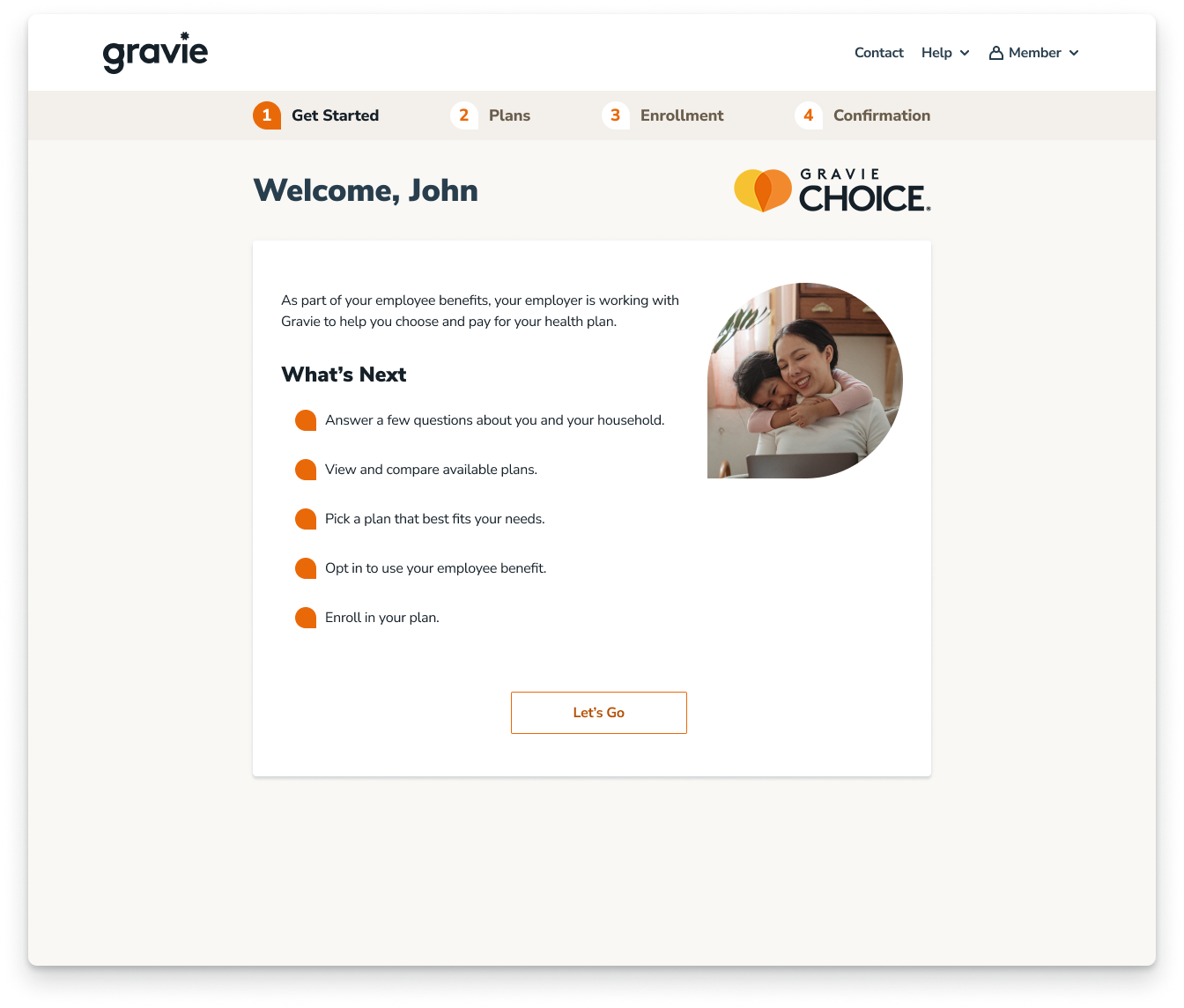
Create your Gravie profile on the “Get Started” page using your personal and family information, if relevant. This profile information will be used to complete your enrollment forms and applications
Step 2: Shop for your health plan
View and compare plans
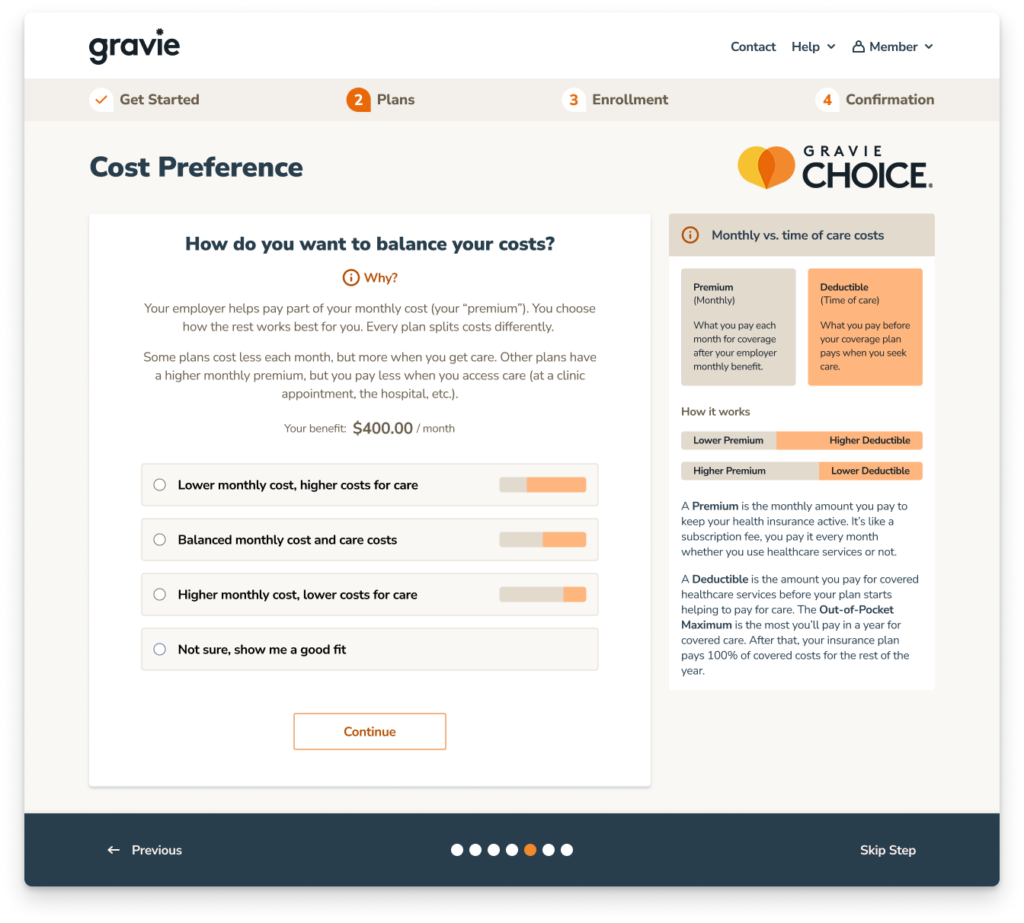
We’ll learn about you, your dependents and what matters most to you in a health plan. Then, we’ll recommend plans that fit your needs.
Compare your recommended plans
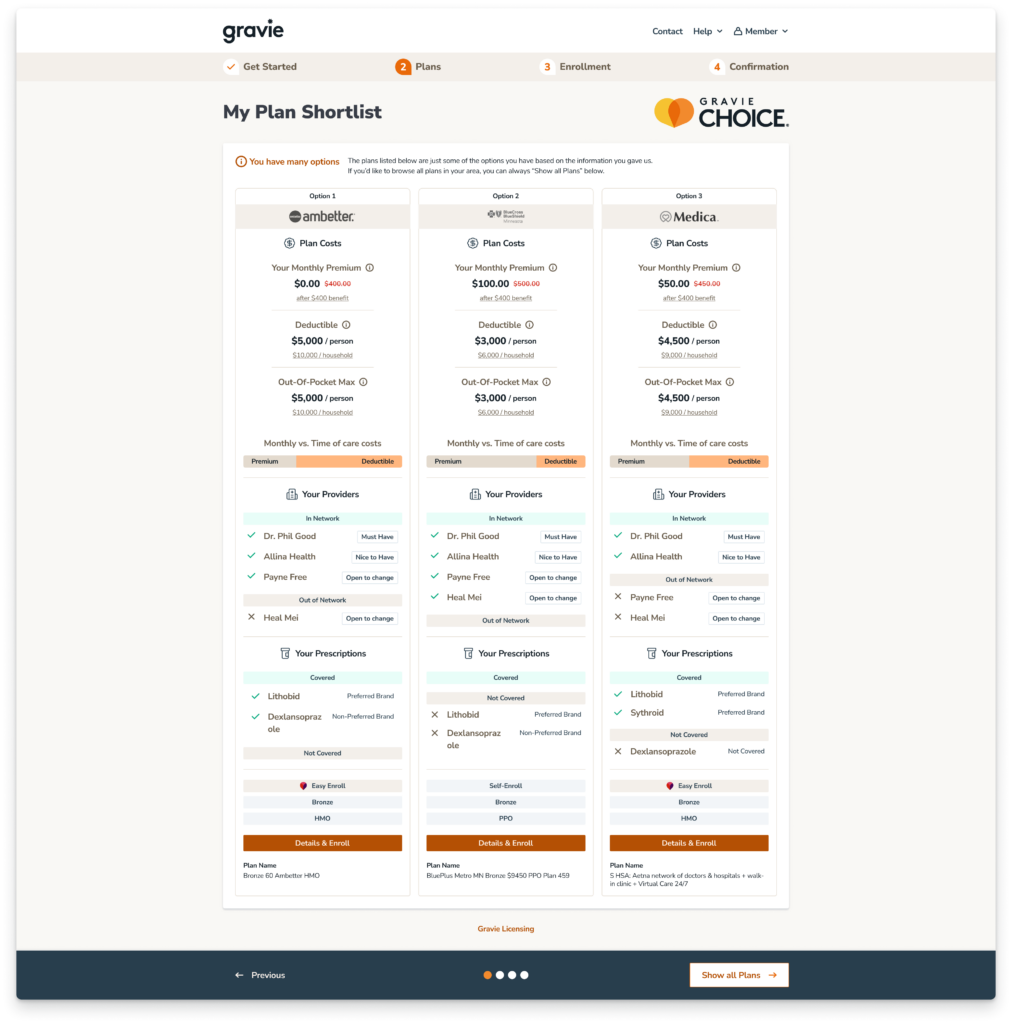
Based on the information you shared, we’ll recommend the plans that best fit your needs. You’ll see your top choices side by side so you can compare costs, coverage and convenience. When you’re ready, select your plan and click Continue.
Your recommendations are based on what you shared, including:
- Provider & Prescription Priority: tell us what matters most for your coverage
- Cost Preference: how you want to balance your monthly premiums, prescription costs and pay for care when you need it
- Care Needs: how do you use health care currently, do you anticipate any changes in the upcoming year
Still want to view more plans?
On the Choose Your Plan screen, you can view all available plan options. Use the filters to narrow.
Be sure to check with your provider directly to verify that they are in-network for your plan.
Filter and compare plan options
1. Customize your search:
Filter the available plans by features such as deductible level, monthly cost, and out-of-pocket- maximum amounts to narrow down choices.
2. Compare and save:
View side-by-side comparisons of plans that interest you. To bookmark them for later, click Save.
3. Monthly Premium:
“Your Monthly Premium” will show the final amount you will be responsible for on a monthly basis after your employer funds are deducted.
4. Plan Details:
View plan options and choose the coverage that’s right for you.
Step 3: Check out and finalize enrollment
Easy Enroll
If you have selected an Easy Enroll plan, then you’re all set! We’ll send you a confirmation email within 24 hours of checkout confirming your enrollment.
Self-Enroll
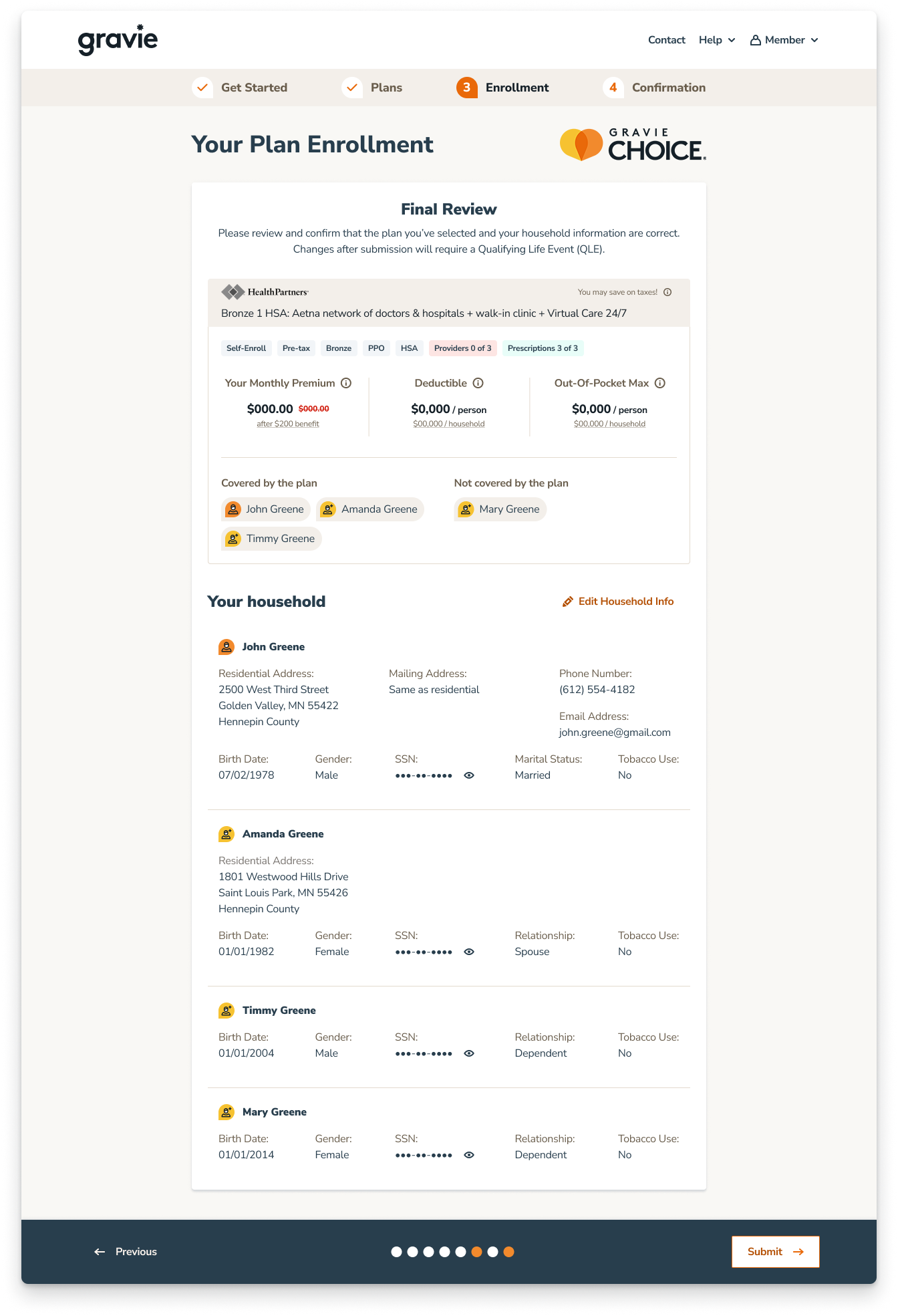
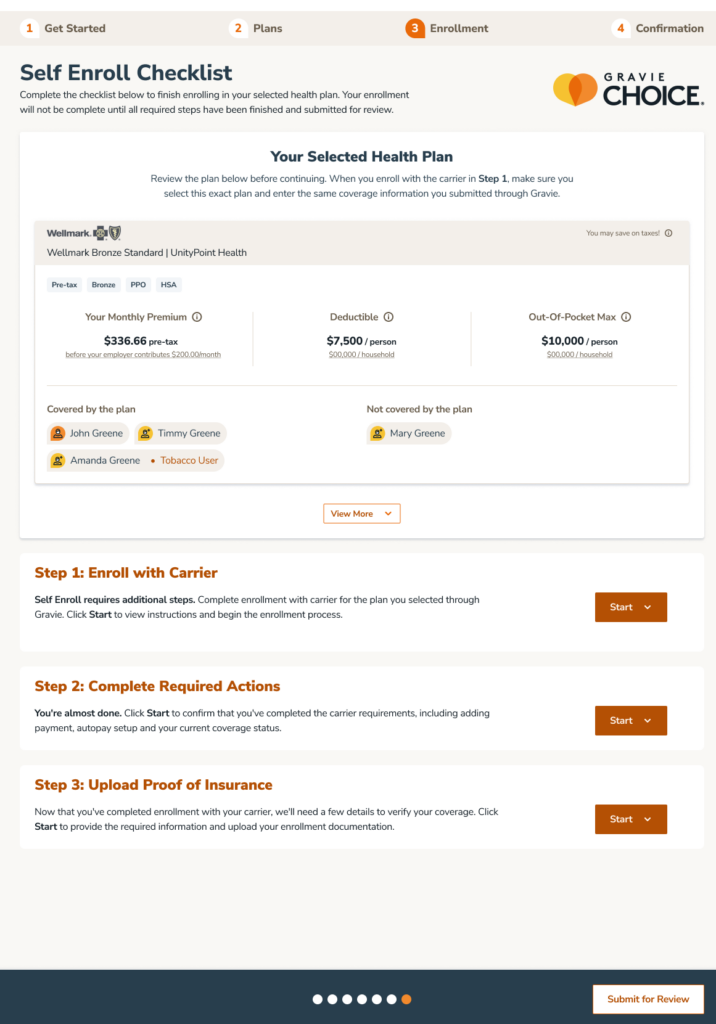
If you selected a Self-Enroll plan, you will need to follow the list of instructions shown at checkout to ensure you complete your enrollment through your chosen carrier.
- Follow the exact instructions to submit your application. This is required in order to complete enrollment in your selected health plan.
- Upload a screenshot of your enrollment confirmation to your Gravie member portal.
Step 4: (Self-Enroll only)
Finish enrollment through your carrier
If you enrolled in a Self-Enroll plan, you’ll need to complete a few additional steps directly with the insurance carrier and then come back to the Gravie portal.
- Complete your application directly on the carrier website
- Set up premium payments (some carriers may require you to pay your first monthly premium at this point)
- Upload Proof of Coverage on the Gravie portal
Set up premium payments (Self-Enroll plans only)
Following enrollment, Gravie creates a Gravie CHOICE virtual funds account that is used to pay your monthly health insurance premiums. Each month, your employer funds this account, and premium payments are sent to your insurance carrier.
Depending on your carrier, you’ll set up payment in one of two ways:
- Scenario 1: Set up autopay while completing your application with the insurance carrier by entering your Gravie CHOICE virtual funds account information.
- Scenario 2: Submit your application first, then set up autopay directly with your carrier before their payment deadline using your Gravie CHOICE virtual funds account information.
Enroll in your CHOICE benefit now
Need assistance?
Gravie Care® advisors are here to help you evaluate plan options, verify network coverage, locate providers, decipher EOBs and bills, and so much more. Give us a call or send a secure message through your Gravie member portal.

Frequently Asked Questions
General information about CHOICE
CHOICE stands for Custom Health Option and Individual Care Expense Arrangement. Formerly known as an Individual Coverage Health Reimbursement Arrangement (or ICHRA), it is a group health benefit plan provided by your employer. Unlike a traditional group plan, you get the power to choose a plan from a marketplace. This lets you tailor your health benefits to your own personal needs.
If you’re enrolled in an Off-Exchange plan, you pay for your health plan premium using pre-tax funds. This can help lower your taxable income and reduce how much you owe in income taxes each year. However, if you’re enrolled in an On-Exchange plan, the member portion of your premium is paid with post-tax dollars.
Eligible CHOICE expenses with Gravie are:
- Premiums for qualified health plans purchased through the individual market
- Premiums for Medicare Part A, B, C, D, or Supplemental
Gravie ICHRA rebranded to Gravie CHOICE following the passing of federal legislation in 2026 that changed the acronym. They both refer the same health benefit offering from Gravie, and this does not change the health plan you are enrolling in at all. You may see the two names appear interchangeably on your screen throughout your enrollment, but no need to worry. It’s the same concept, just with a new, easier-to-pronounce name.
Gravie helps you take advantage of your CHOICE benefit by collecting your total premium dollars from your employer and setting up accounts so your chosen insurance carrier can pull funds directly.
If you choose a plan through Gravie’s Easy Enroll option, we handle both enrollment and payment setup for you. If you choose a Self-Enroll plan, you’ll need to complete enrollment on the carrier’s website and connect your Gravie account so your payments are applied correctly.
Gravie helps you get enrolled and makes sure your payments are set up, but your health plan is with the insurance carrier. This means you are responsible for things like understanding your coverage, making changes if your situation changes, and contacting the carrier if you have questions about your benefits or claims.
Your health insurance coverage does not automatically cancel if your employment ends. You are the policyholder of your health insurance coverage, not your employer. It is your responsibility to contact your insurance carrier to terminate or update your coverage as needed when you leave your employer.
Yes, depending on your coverage decisions and timing. When your employment ends, your eligibility for employer-funded benefits typically ends as well. If you do not take action to cancel your health insurance coverage at that time, your plan may continue, and the insurance carrier may still pull premium payments. Since you are no longer eligible for employer contributions, you could become responsible for paying the full premium amount, including any amounts your employer previously covered.
This can result in owing your former employer money if they fronted payments on your behalf after your termination date. To avoid this, it’s important to:
- Immediately cancel your plan upon employment termination if you do not intend to continue it.
- Update your payment information if you choose to continue the plan independently (outside of employer funding).
What if I want to keep coverage after I leave?
If you want to maintain health coverage after you leave your job, you have a couple of options:
- Continue your plan independently: If the plan is a type you can carry with you (EX: individual coverage through Gravie), you’ll be responsible for 100% of the premium and must provide updated billing information.
- Elect COBRA: If you’re eligible, COBRA continuation coverage allows you to stay on your employer-sponsored health plan temporarily for an additional administrative fee. This is usually more expensive because you’re paying the full cost (both employee and employer portions).
For more information about COBRA eligibility, costs, and deadlines, we recommend reviewing the official COBRA notice provided by your employer.
Please reach out to Gravie if you need help with the enrollment process. Our Gravie Care team can assist you in selecting the plan that best fits your needs and guide you through the enrollment steps. Anything to do with your Gravie account you can call the GC team.
Once you are enrolled, you should contact your insurance carrier for questions around things like claims, to cancel your plan if you become ineligible or leave your employer, or to set up autopay if you select a self-enroll plan. Anything to do with your actual health insurance coverage, you should contact your carrier.
CHOICE funding and payments
A Gravie CHOICE virtual funds account is a virtual bank account that is created to house your CHOICE funds. This includes the pre-tax contribution your employer makes, as well as any remaining amount you are responsible for that is deducted from your paycheck.
To access your Gravie CHOICE virtual funds account, go to your Gravie member portal at member.gravie.com. If you’re using CHOICE funds toward Medicare premiums, you’ll need to submit an enrollment form that our Gravie Care team can provide you with.
When you log in to your Gravie member portal, you’ll see your monthly pre-tax contribution amount. This amount depends on how much your employer contributes to your plan.
When viewing plan options while shopping, premiums will be offset by that amount. If you enroll in a health plan directly with the insurance company, any premium remainder owed by you will be paid with pre-tax payroll deductions.
Depending on if you choose an Easy Enroll or Self-Enroll plan, you will have a different experience:
Easy Enroll: Gravie will coordinate the payment of your medical premiums with your employer to your chosen health plan provider using your Gravie ICHRA virtual funds account,
regardless of which individual health plan you’ve selected. This allows Gravie to monitor payments to your carrier in order to help eliminate payment issues with your plan.
Self-Enroll: You will need to submit your first month’s payment directly to your health plan carrier. Then, set up autopay through your carrier for ongoing monthly premium payments to
ensure your plan remains active throughout the year.
No, you cannot use CHOICE funds toward the cost of a spouse or parent’s group plan. CHOICE funds can only be used to pay for individual health plans as part of Gravie’s ICHRA benefit, as arranged by your employer.
For Easy Enroll plan members: Gravie facilitates your payments to the carrier via Gravie CHOICE virtual funds account. We’ll audit to make sure that your coverage remains active and funds are being applied to your premium correctly. However, we are not notified directly in the event of a payment issue. Review your monthly invoices and call Gravie Care if you ever notice a past-due amount.
For Self-Enroll plan members: In certain situations such as Medicare-eligible members or other situations where you pay the insurance carrier directly and are reimbursed for your CHOICE contribution, Gravie will attempt to verify the status of your coverage each month. Keep in mind that your Gravie CHOICE virtual account funds must be used toward premiums, so your coverage needs to remain active to keep using the benefit. In limited scenarios, if Gravie is unable to verify coverage on your behalf, we may ask that you complete a simple form each month.
If your employer offers you an CHOICE that meets federal affordability standards, you and your household will not qualify for premium tax credits. But if your employer’s contribution does not meet the affordability standards set by the Department of Labor and the IRS, you may still be able to apply for premium tax credits.
If you have experienced a qualifying life event and are currently enrolled in a marketplace plan, you can switch to a Gravie CHOICE plan. To do so, you must notify the Gravie Care team if you’ve had a qualifying life event in the last 60 days or expect to have one in the upcoming 60 days. This qualifying life event will trigger your ability to make changes to your individual plan and update your CHOICE allowance to match your current situation.